
How to Search Cases by Name
Pick the court first, then search by name. County Court records cover criminal, civil, and probate cases through the County Clerk's iDocket service. For a wider net, re:SearchTX spans the whole state. Felonies, family matters, and major civil suits sit with the 97th District Court instead. The Clay County District Clerk holds those court records. Justice Court and Henrietta Municipal Court handle the lower-court cases.
- Read the notice and identify the court and case type.
- Open the official local system or re:SearchTX.
- Enter a surname or business name, then add other terms if the live form permits.
- Narrow by Clay County, court, case type, filing date, or status when offered.
- Match the full style, cause number, court, and filing date before opening the case.
- Call or visit the responsible office when no reliable match appears.
iDocket's Clay County form does not publish fixed field labels, so treat no single field as required. re:SearchTX, by contrast, documents its controls clearly.
| Field label | Type | Required | Notes |
|---|---|---|---|
| Cases | Search mode | Unspecified | Search the case index and details |
| Keyword | Text | Unspecified | Enter a name or case term |
| County | Advanced filter | No | Narrow to Clay County |
| Court | Advanced filter | No | Select a court when available |
| Party | Advanced filter | No | Limit a party search |
| Search | Button | Yes | Runs the entered query |
Clay County Case Lookup Routes
Clay County splits its records between offices. The District Clerk holds district felony, civil, family, and district case files. The County Clerk keeps County Court misdemeanor, civil, probate, and guardianship files. Justice Court handles traffic, Class C, small claims, debt claim, eviction, and repair-and-remedy dockets. That reach stays within its jurisdiction.
| Case clue | First search route | Fallback |
|---|---|---|
| Felony, family, major civil | District Clerk or re:SearchTX | 97th District Court and clerk counter |
| County misdemeanor, probate, guardianship | County Clerk and iDocket | County Clerk phone, mail, or counter |
| Traffic, Class C, small claim, eviction | Justice or municipal court | Justice Court phone and records request |
| Citation or public notice | Texas citation/notice portal | The court named on the document |
Knowing the route prevents a common mistake. A no-result answer in one system does not mean Clay County has no case on file.
How to Search by Case Number
A full cause number beats a name for precision. Keep every letter, digit, and hyphen exactly as written. Official Clay County materials show formats like 24-039-DCCR-0050 for a district criminal pattern, 23-005-DCCV-0103 for district civil, and 2023-0082A-CV in a County Court civil context. These are illustrations, not a universal numbering rule. Try the complete number first. If it fails, ask the clerk whether the system wants a leading year, a court prefix, or a shortened sequence. Do not strip a case-type code just because another portal formats differently. A transferred or appealed case can carry a new number in the receiving court.
Clay County iDocket Coverage
The Clay County iDocket simple search is the public local route into the County Clerk's case-management system. That official page lets the public run a search. It depends on a session, so the fields you meet may vary from visit to visit.

The coverage dates set the main limit. iDocket reports misdemeanor records since March 1, 2003, civil since January 1, 2007, and probate since March 1, 2005. Its Clay County table lists no felony or family coverage date. So a felony or family search should move on to the District Clerk and re:SearchTX instead of stopping at iDocket. One more caution on numbers. Vendor totals are cumulative, not annual or active-case counts. They say nothing about the current Clay County caseload.
What a Case Search Shows
A Clay County case result is an index entry. Depending on the portal and case type, it may open a chronological docket, hearing detail, or an available filing. It does not promise free access to every document in the file.
| Case Number | The clerk-assigned identifier used to match the file and later settings. |
|---|---|
| Style or Parties | The formal caption and public party roles, subject to access limits. |
| Court | The court that owns or heard the matter. |
| Case Type | The record category, such as criminal, civil, family, or probate. |
| Filed Date | The date the initiating paper was filed, not the latest activity date. |
| Status | A lifecycle label such as pending, disposed, sealed, or appealed. |
| Filings and Hearings | Public event data where the system and access level expose it. |
A docket entry is not a filed image or a clerk-certified copy. Those are different products. When the index alone is not enough, ask the responsible Clay County clerk about the specific document you need.
Clay County re:SearchTX Modes
The official re:SearchTX portal offers four useful modes: Cases, Filings, Text, and Hearings. Register as a public user and you can enter a keyword, sharpen it with advanced filters, and click through to case, filing, or hearing detail. Export and saved-search tools may also open up after sign-in.
- Cases
- Find case indexes and open case details.
- Filings
- Search filing records connected to cases.
- Text
- Search document text where that content is available.
- Hearings
- Find setting data and open hearing details.
Public document images may require a purchase. Coverage also depends on clerk integration and case type. The statewide tool is broad, yet the originating Clay County clerk still controls the official record.
Clay County Citation Search Limits
The Texas citations and notices search offers Name, Cause Number, Court/County, and Status fields. Its official instructions suggest a few search words and allow an asterisk as a suffix wildcard. Entering joh*, for example, expands a name stem.
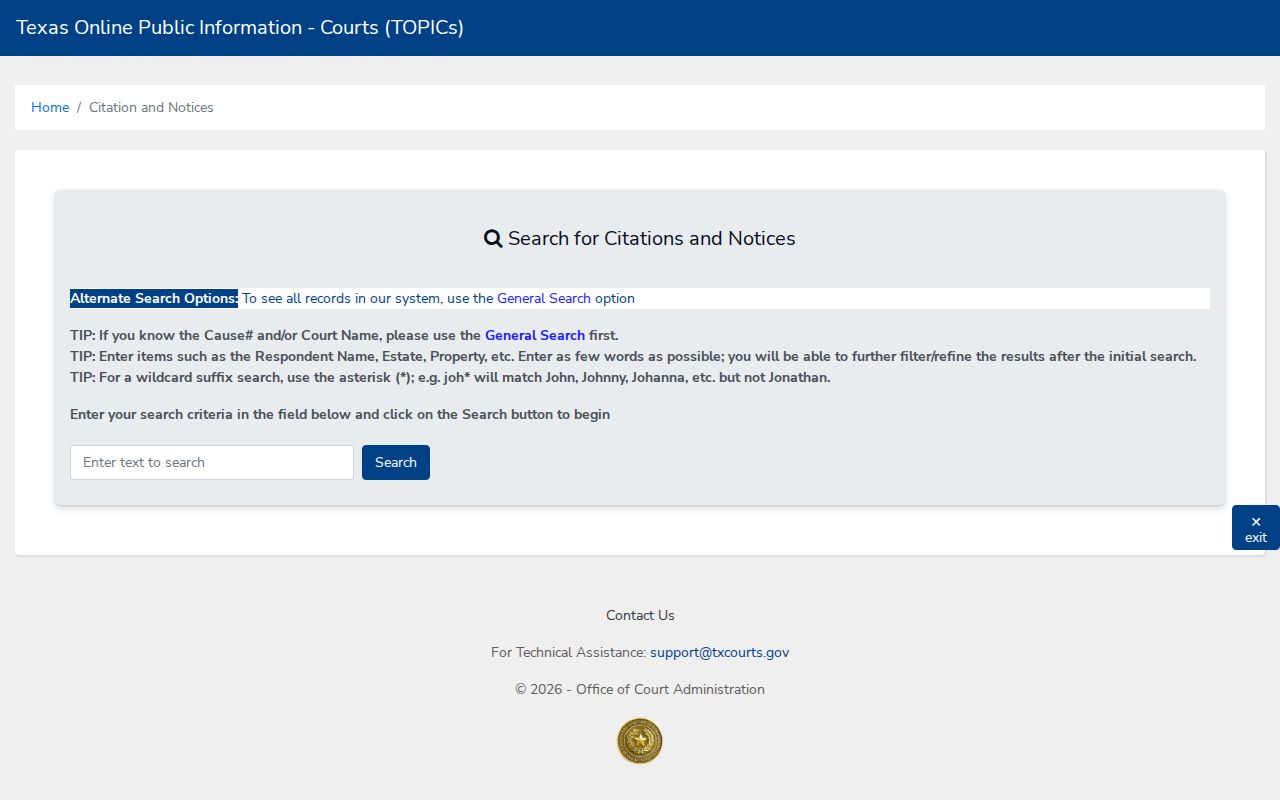
That search route holds official notices, not a full Clay County trial docket. Use it for the document slice it actually keeps. Then return to the clerk or court for the case register and the filed record.
County vs Statewide Case Search
County and statewide routes answer different questions. iDocket ties to Clay County County Clerk records and posts useful coverage tables. re:SearchTX spans participating courts, which helps when a case crosses counties or never shows up in the local index.
| Point | re:SearchTX | Clay County iDocket |
|---|---|---|
| Scope | Statewide participating records | Clay County Clerk system |
| Search modes | Cases, Filings, Text, Hearings | Live session and vendor controls |
| Known limit | Coverage varies by integration and type | No listed felony or family start date |
| Best use | Broader cross-check and hearing search | Covered County Court matters |
| Official copy | Check document access separately | Request from the County Clerk |
Neither route stands in for the District Clerk, County Clerk, or a lower court. OCA keeps no individual Clay County case files.
Clay County Lower-Court Cases
One Justice Court serves the whole county. It takes small claims, debt claims, evictions, repair-and-remedy matters, traffic cases, and other statutory work. The official Justice Court civil information spells out what filers need to know.
The court publishes no stable public case-search form. The working chain is its own page, phone line, counter, and records-request forms. Call 940-538-6531 with your case number or citation details in hand. Henrietta Municipal Court is listed separately. Still, the local Justice Court page tells anyone holding a Henrietta municipal citation to call that same number. That is where information comes from.
Clay County Index or Document
A docket search result has its limits. It can name the case and list events while never showing the pleading or order behind them. re:SearchTX covers document purchase inside its registered workflow. iDocket notes that participating counties may offer document images. None of that guarantees every Clay County filing is online.
Need a plain or certified copy? Contact the clerk who keeps the file. District records sit with the District Clerk, and County Court records with the County Clerk. Justice Court records stay in that court. A written request should list the court, cause number, case style, document name, date range, copy type wanted, and your contact details.
Clay County Traffic Case Lookup
Traffic and fine-only matters move through a lower-court path. The Clay County Justice Court traffic information lays out the response and setting choices a driver has, and that page appears just below.
Start with the citation itself. The appearance date and the court named on the ticket are your facts. A ticket can take seven to ten days to reach the court, so an early no-result search may just mean the filing has not landed yet. After a not-guilty plea or a notice of representation, the case may land on a pretrial docket.
Clay County Search Fallback Chain
Nothing coming back? Confirm the county and court printed on the source document first, since a mismatch there sinks every Clay County docket search. Then run the responsible clerk's system and re:SearchTX. The citation portal works only for citations and notices, and it cannot stand in for the trial docket.
- Call the District Clerk at 940-538-4561 for district files.
- Call the County Clerk at 940-538-4631 for County Court and iDocket records.
- Call Justice Court at 940-538-6531 for its docket or a Henrietta municipal citation.
- Call the 97th District Court coordinator at 940-894-2066 for a district setting.
- Visit the right counter and ask about staff-assisted public lookup.
- Mail or email a focused record request with the cause number and copy type.
Older paper files and records never digitized may need staff research at the courthouse. Clay County posts no universal turnaround time, public-terminal promise, or ID requirement for ordinary public inspection, so ask the clerk directly.
Restricted Cases and Access Rules
Not every Clay County case is open online. Juvenile, adoption, protective-order, and mental-health records, plus anything sealed by law or court order, may hide party data. They may also hide event detail or filing images. Read the markers carefully. A restricted flag does not grant access. A missing document does not prove the whole case is sealed.
Texas Rule of Judicial Administration 12 governs access to covered judicial records. It sends a request to the custodian. Texas Rule of Civil Procedure 76a supplies the civil sealing framework. The request route differs, though, for ordinary case files, administrative judicial records, and state-agency records.
No result is not proof of sealing. Check the court, clerk, case type, spelling, number, date range, and portal coverage before drawing that conclusion.
Access to a sealed or confidential Clay County record may require authority or a court order. Ask the custodian for the case-specific process.